What happened to Firebase Dynamic Links?
Google shut Firebase Dynamic Links down on 25 August 2025. According to Google's own FAQ, every link served by the service stopped working on that date, including links on custom domains and on page.link addresses.
Google did not release a replacement. It points developers in two directions:
- Universal Links on iOS and App Links on Android, which are built into the platforms and open your app when it is already installed.
- A third-party deep linking provider if you need everything Dynamic Links did.
The part that the platforms do not cover on their own is the deferred one: remembering where a person came from when they did not have the app yet, went to the store, installed it and opened it for the first time.
What do Insert Links replace?
Insert Links are deferred deep links. They cover the things most teams used Dynamic Links for when sharing an app:
- One link for iOS and Android. The link detects the device and sends each person to the right place.
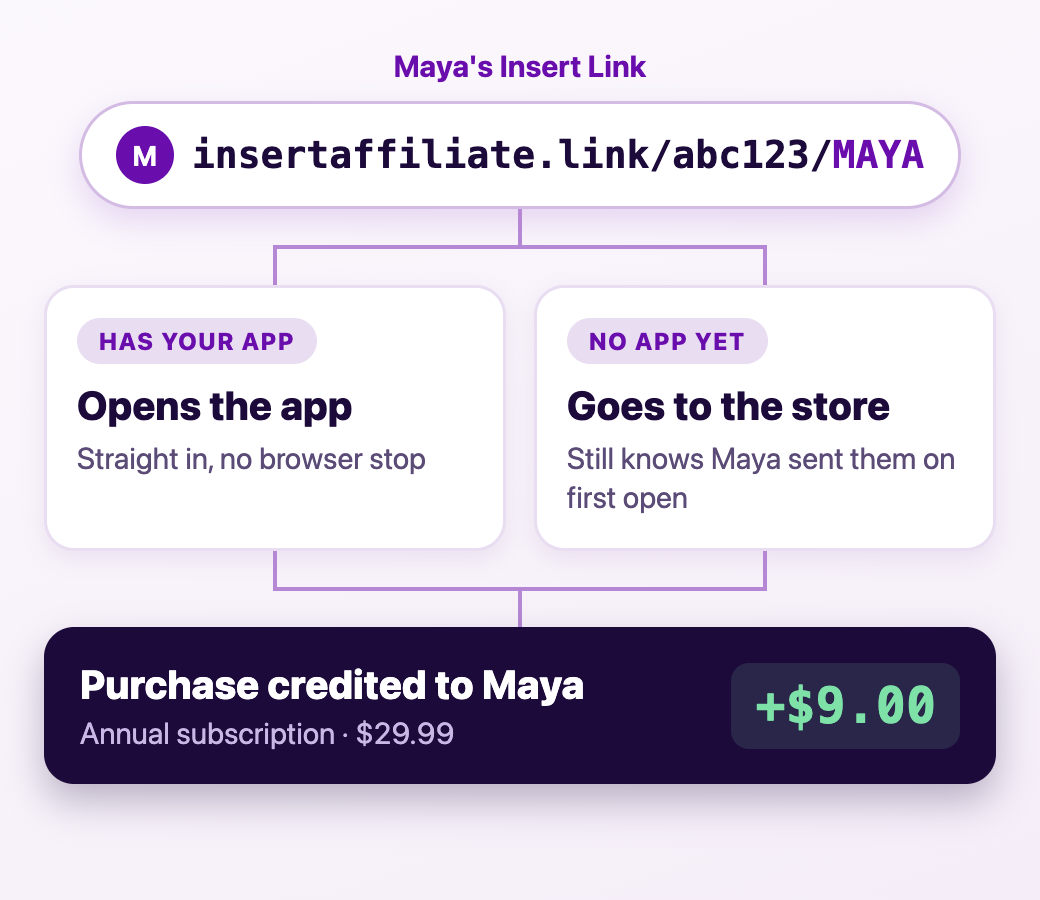
- Opens the app if it is installed. With Universal Links and App Links set up, the app opens directly without a stop in the browser.
- Goes to the store if it is not. People without the app land on the App Store or Google Play.
- Remembers who sent them. When the app is opened for the first time after install, it still knows which link the person came from.
- A preview when shared. Links show a card with an image, title and description in messaging and social apps. Enterprise plans can customise it.
- Your own domain. Enterprise plans can use a branded domain in place of the default one.
What do Insert Links do that Dynamic Links did not?
Dynamic Links got the person into the app and stopped there. Insert Links are part of Insert Affiliate, so each link belongs to a person, and what happens after the install is tracked too.
- Purchases are credited to the link. In-app purchases and subscriptions on iOS and Android are matched to the creator, affiliate or user who shared the link.
- Commission and rewards are worked out for you, on the first purchase or on renewals as well.
- Each sharer has a dashboard showing their clicks, sales and earnings.
- Payouts are built in, through Stripe Connect.
- Refer a friend is ready-made. In-app referrals give every user their own link and code to invite friends.
How do the options compare?
| Universal Links and App Links only | Insert Links | General deep linking platforms | |
|---|---|---|---|
| Opens the app when installed | Yes | Yes | Yes |
| Sends new users to the right store | No | Yes | Yes |
| Remembers the referrer after install | No | Yes | Yes |
| Credits purchases to the person who shared | No | Yes | Usually needs extra tools |
| Pays commission or rewards | No | Yes | No |
| Links for email, ads and every other channel | Yes | No, built for partner and referral links | Yes |
When is a different tool the better fit?
Insert Links are made for links that belong to a person: an affiliate, a creator or a user inviting a friend. That is a deliberate limit.
If you need deep links for every marketing channel, such as email campaigns, paid ads, QR codes and web banners, a general deep linking platform such as Branch or AppsFlyer is the better choice. You can still run your affiliate programme on Insert Affiliate alongside it, because Insert Affiliate works with Branch, AppsFlyer and other providers as well as with Insert Links.
If all you need is for existing users to open the app from your website, Universal Links and App Links on their own will do it.
How do you move over from Dynamic Links?
Old Dynamic Links cannot be redirected, because the addresses belonged to Google and now return an error. Moving over means issuing new links:
- Set up Insert Links once, following the Insert Links guide.
- Add your creators, affiliates or referring users. Each gets a new link automatically.
- Ask them to swap the old link for the new one wherever they have posted it.
For more on how these links work, see deep links, universal links and deferred deep links compared.