In-app referrals

Mobile App Referral Program Software

Give every user their own code and link from a ready-made Refer a friend screen, then reward them when the friends they invite sign up or subscribe.

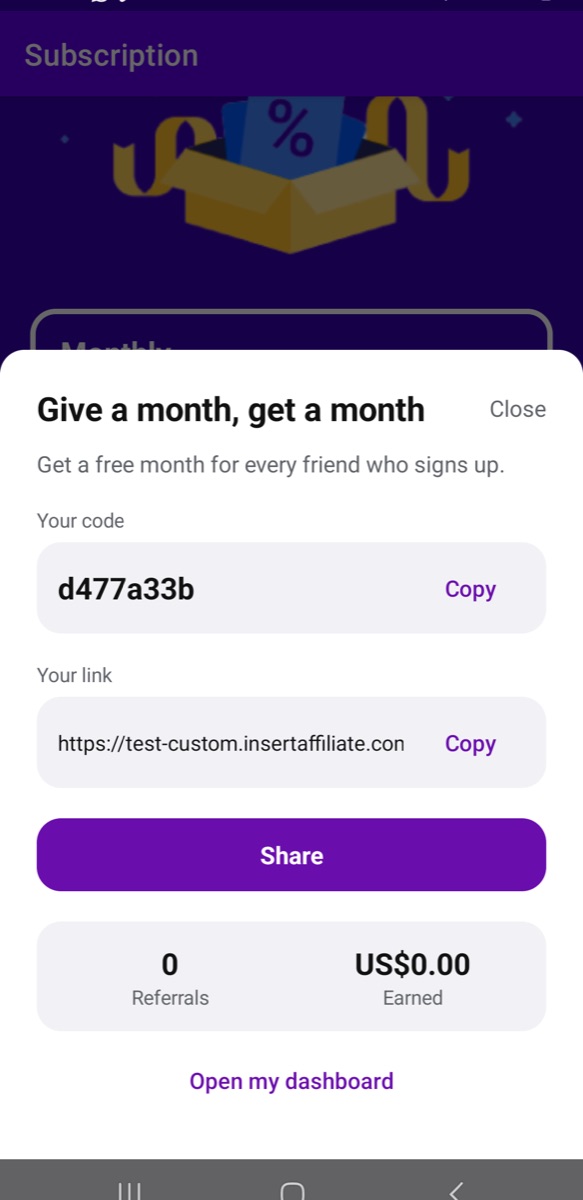
Refer a friend screen in a mobile app with the headline Give a month, get a month, the user’s code and link with Copy buttons, a Share button, and totals for referrals and amount earned

How it works

Insert Affiliate has a referral program for mobile apps built in. The feature is called in-app referrals. Your app shows a Refer a friend screen, each user gets their own code and link to share, and you can see how many friends each of them has brought in.

You choose what counts as a referral and what the referrer gets for it: free premium time given automatically, a reward your app grants itself, cash commission, or a mix of these.

This page covers what your users see, what your team has to set up, the rewards you can offer and how a referral program sits alongside an affiliate program for creators.

What your users see

Refer a friend screen in a mobile app with the headline Give a month, get a month, the user’s code and link with Copy buttons, a Share button, and totals for referrals and amount earned
Once a user has joined, the screen shows their code and link, a Share button and how many friends they have referred.
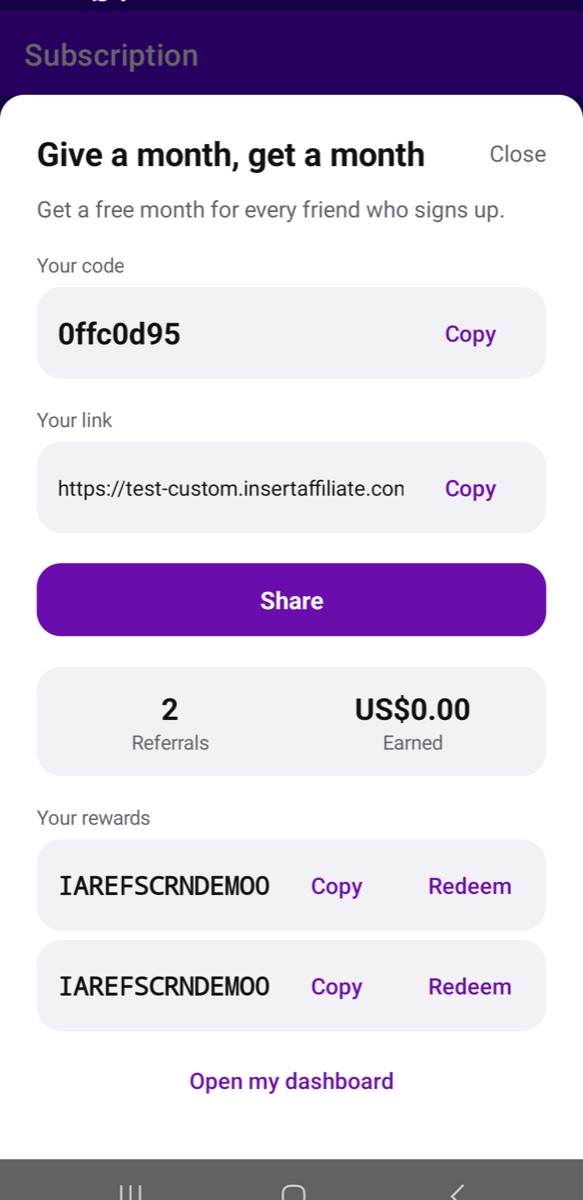
Refer a friend screen showing 2 referrals and a Your rewards list with two reward codes, each with Copy and Redeem buttons
Reward codes a referrer has earned appear on the same screen, each with a Redeem button.
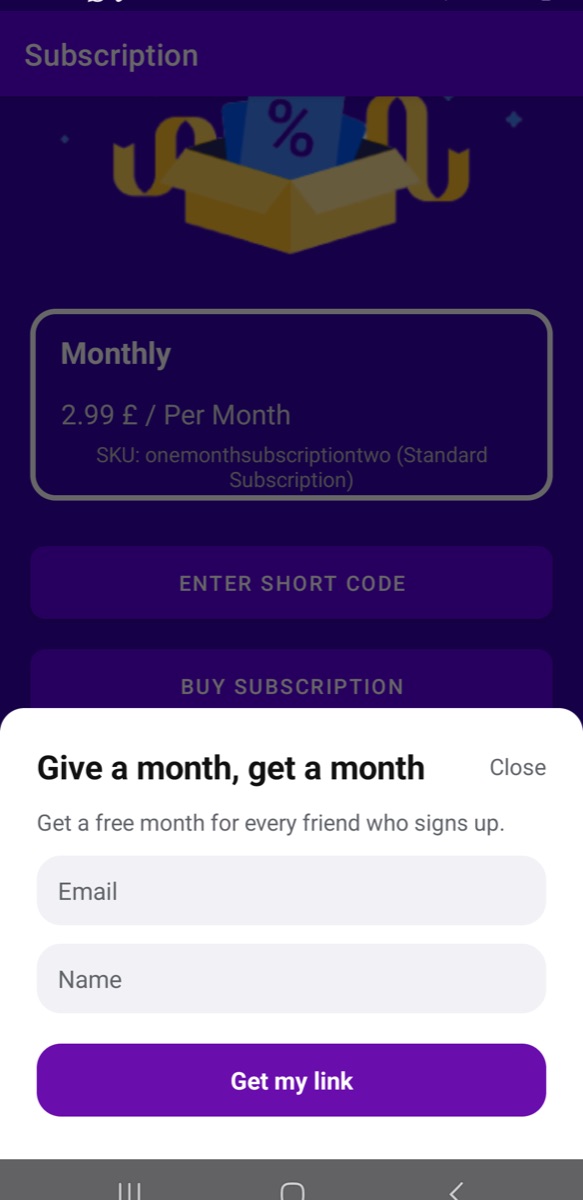
Refer a friend join screen opened over an app’s subscription page, with the headline, the reward text, Email and Name fields and a Get my link button
A user joins with their email and name, under the headline and reward text you set in your dashboard.

Setting it up

  1. Step 1

    Turn on in-app referrals

    Switch the feature on in your Insert Affiliate dashboard and choose what counts as a referral: a friend making a purchase, completing an in-app event such as signing up, or installing the app.

  2. Step 2

    Choose the rewards and the wording

    Decide what referrers earn and whether their friends get a discount, then set the headline, reward text and button colour shown on the screen.

  3. Step 3

    Show the screen in your app

    Open the ready-made Refer a friend screen from wherever suits your app, using the Insert Affiliate SDK. If you prefer your own design, you can build the screen yourself.

  4. Step 4

    Follow the results

    Your dashboard shows your referrers, referrals in total and this month, rewards given and your top referrers.

What your users see

Your app opens a Refer a friend screen. A user who has not joined yet enters their email and name and taps one button. After that the screen shows:

  • Their own code and link, each with a Copy button.
  • A Share button that opens the phone's own share sheet.
  • How many friends they have referred and what they have earned.
  • Any reward codes they have earned, each with a Redeem button.

You set the headline, the reward text and the button colour in your dashboard, and changes reach your app straight away with no app release. The screen ships in English, and your app can replace any label to translate or reword it.

Rewards you can offer

Your choices apply to each new referrer who joins from your app.

  • Free premium time, given automatically. The referrer gets free time the moment a referral counts.
  • A reward you grant yourself. Insert Affiliate reports each user's referral count, and your app gives credits, tokens or anything else you choose when it goes up.
  • Cash commission. Use your default commission, a different rate just for referrers, or no cash at all.
  • A discount for the friend. Pick one of your existing offers for iOS, Android and web, and friends who use a referrer's code or link get it.

You can also limit how many rewards one referrer earns each month.

How free premium time is delivered

With RevenueCat or Adapty, the free time is added to the referrer's account, and rewards stack. With native App Store and Google Play purchases, or Iaptic, iPhone referrers get a one-time App Store offer code on the referral screen. On Android, subscribers have their next Google Play bill moved back, and everyone else gets a Google Play promo code. Apps on Apphud cannot use the automatic option, so they grant the reward themselves. The docs list what each setup needs.

How a referral is counted

You decide which action counts:

  • A friend makes a purchase. This is the recommended option, and it counts new purchases, not renewals.
  • A friend completes an in-app event, such as signing up.
  • A friend installs the app.

Each friend counts once, and a referrer's count only ever goes up. A purchase counts once it has been verified through your purchase setup, the same as any affiliate sale.

Referral program vs affiliate program

A referral program rewards your existing users for inviting friends, usually with something inside the app. An affiliate program pays creators and partners commission on the sales they bring in.

In Insert Affiliate an in-app referrer is a normal affiliate. They get a dashboard login, appear in your affiliate list with a badge that shows they joined in the app, and can earn commission, in-app rewards or both. Each referrer counts towards your plan's affiliate limit.

So you can run a referral program for users next to an affiliate program for creators from one account. There is more in how in-app referrals turn users into affiliates.

Which apps it works with

In-app referrals are part of the Insert Affiliate SDKs for iOS (Swift), Android, React Native, Flutter, Unity and JavaScript. The feature sits on top of your normal Insert Affiliate setup, so start with the integration that matches how your app sells.

Frequently asked questions

How do I add a referral program to my app?
Turn on in-app referrals in your Insert Affiliate dashboard, choose what counts as a referral and what referrers earn, then show the ready-made Refer a friend screen from your app with the SDK.
Can I reward users with free premium time?
Yes. Free premium time can be given automatically when a referral counts, for apps using RevenueCat, Adapty, native App Store and Google Play purchases, or Iaptic. Apps on Apphud grant the reward themselves.
What is the difference between a referral program and an affiliate program?
A referral program rewards existing users for inviting friends, while an affiliate program pays creators and partners commission on sales. In Insert Affiliate an in-app referrer is a normal affiliate, so you can run both from one account.
What counts as a referral?
You choose: a friend making a purchase, a friend completing an in-app event such as signing up, or a friend installing the app. Purchases are the recommended option, and each friend counts once.
Can I design my own refer a friend screen?
Yes. You can restyle and reword the ready-made screen, or skip it and build your own screen with the same SDK methods it uses.
Are referral programs allowed on the App Store and Google Play?
Yes. Referral programs are allowed on both stores, and the ready-made screen is built to follow their rules. For example, sharing is always optional and goes through the phone’s own share sheet.

Documentation

Full setup instructions and code samples are in the docs.

I want to help you setup your iOS or android affiliate scheme

Book a call with me and we can run through your ideas, get help with setup, or speak to me about your current affiliate situation

“I couldn't use affiliate marketing in my subscription app, so I built insert affiliate to solve this issue”
- Michael Butler, CEO
Michael Butler, CEO