App screenshots






About the app
AI trip planner — for a trip worth taking. Get personalized travel recommendations based on what you love. Tell Plan WeGo what kind of trip you want, what you enjoy, and how much you want to spend. The AI travel planner uses your preferences to help you discover destinations and ideas that fit your trip—instead of giving you generic recommendations. Not sure exactly what you want yet? That’s fine, too. Start with what you know, explore recommendations, and refine your plan as your ideas come together. AI road trip planner. More than a map.
Read more
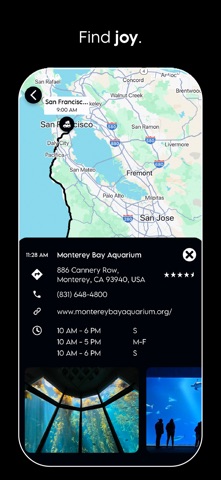
Discover the stops that make the drive worth taking. Plan WeGo’s AI road trip planner helps you find attractions, restaurants, scenic spots, hidden gems, and things to do along your route. Tell us where you’re going and what you’re into, and get recommendations tailored to your interests. Uncover places you might otherwise drive past and turn the miles between destinations into some of the best parts of your trip. Travel planner with Google Maps to see your whole trip. Get it all on Google Maps. Organize destinations, hotels, restaurants, attractions, and other stops in one place, then see how everything fits together before you go. Whether you’re planning a weekend getaway, road trip, or multi-city vacation, mapping your plan makes it easier to understand distances, organize each day, and build a smoother itinerary. When you’re ready to travel, your planned places are easy to access along the way. Travel journal to capture your trip and save all your memories. Add ratings, notes, photos, and comments to every part of your trip and turn your itinerary into a travel journal you can look back on. Share it with friends and family so they can comment, add photos, or follow along. Travel budget tracker. Plan smarter. Spend better. Plan the trip and keep spending in sight. Plan WeGo lets you set a budget, track travel expenses, and keep spending information alongside your itinerary. From hotels and transportation to meals and activities, keep an eye on what the trip is costing without a separate spreadsheet or expenses scattered across different apps. Family travel planner for trips everyone in the family can enjoy. Personalized picks that fit your crew and budget. Plan WeGo helps you find ideas based on your family’s ages, interests, food preferences, and budget so you spend less time sorting through options that do not fit. Build the itinerary around your family and keep practical details together as the trip takes shape. Group travel planner. Better trips, planned together. Plan together without living in the group chat. Plan WeGo gives your group one place to organize the itinerary, share updates, keep trip information together, and stay connected as plans change. Trip planner. Keep all details handy. Keep your flights, hotels, reservations, transportation, activities, notes, ideas, and daily plans organized in one place. Add plans you already have, book new ones, build out each day, and keep important details connected to your itinerary. When something changes, simply update your trip without starting over. From travel ideas and recommendations to a personalized itinerary, Plan WeGo keeps your entire trip organized, easy to access, and share. Road trip planner for a better road trip. As the road unwinds, so does your plan. Plan WeGo’s road trip planner helps you map your route, organize destinations, plan driving days, and build a multi-stop road trip itinerary in one place. Add overnight stays, activities, reservations, and must-see stops as you go. Whether you’re planning a weekend drive or a cross-country adventure, keep your route and itinerary connected—so you spend less time juggling trip details and more time enjoying what’s beyond the next turn. Ready to go? Try it for free. We offer a monthly or annual auto-renewing subscription. Prices vary based on location. Terms of Use: https://www.planwego.com/terms Privacy Policy: https://www.planwego.com/privacy_policy
- Developer
- Plan WeGo Inc
- Category
- Travel
- Age rating
- 12+
- Available on
- iPhone
What to post
Post ideas, not real affiliate posts
- Post idea
Road Trip Planning Demo
Screen record planning a drive in Plan WeGo. Show how the AI suggests scenic stops and restaurants directly along your route, then cut to footage of you visiting one of those hidden gems.
- Post idea
Ditching Spreadsheets for Travel Planning
Show your old messy travel spreadsheets versus Plan WeGo. Walk through how it maps every hotel and activity on Google Maps while tracking daily expenses in the exact same itinerary.
- Post idea
Planning Group Trips Without Group Chat Chaos
Film yourself coordinating a vacation with friends inside Plan WeGo instead of texting endlessly. Show everyone adding activities, reviewing the shared itinerary, and uploading photos to the trip journal.
How it works
- 1
Share your link or code
Put it in your bio, videos or stories.
- 2
Earn on each sale
Get commission when someone you referred subscribes or buys.
- 3
Get paid
Track every referral in your dashboard and get paid out.
Questions
- How much can I earn promoting Plan WeGo?
- You earn 20% of every payment from people you refer, for as long as they stay subscribed. With 100 subscribers on the current plan mix that is about $69 a month.
- When do I get paid?
- The company pays you directly. Paid at least every 4 months once you pass the minimum.
- How are my referrals tracked?
- You get your own link and short code. Anyone who taps your link or enters your code before their first purchase is linked to you, and their renewals keep counting.
- Does it cost anything to join?
- No. Joining is free for affiliates.
Earnings example
EstimateEstimated from this app's App Store prices and the industry average split between plans (RevenueCat State of Subscription Apps 2026). Not this app's own sales. An example, not a promise.
How you get paid
- The company pays you directly
- Paid at least every 4 months once you pass the minimum
What you share
Your own link and a short code. Followers tap the link, or enter the code in the app before they buy.
I want to help you setup your iOS or android affiliate scheme
Book a call with me and we can run through your ideas, get help with setup, or speak to me about your current affiliate situation
“I couldn't use affiliate marketing in my subscription app, so I built insert affiliate to solve this issue”- Michael Butler, CEO