GanttMaster affiliate program
App screenshots



About the app
Manage projects with your whole team. No extra cost for additional team members. Plan smarter. Track better. Collaborate faster with GanttMaster. GanttMaster is a powerful, easy-to-use project management app built for teams, freelancers, startups, and businesses of any size. Unlike many project management tools that charge for every additional team member, GanttMaster lets you collaborate without worrying about growing per-seat costs.
Read more
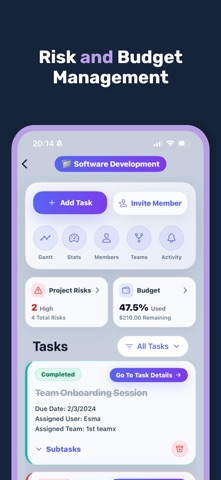
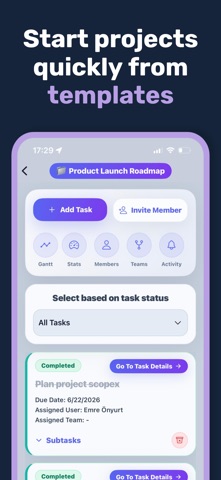
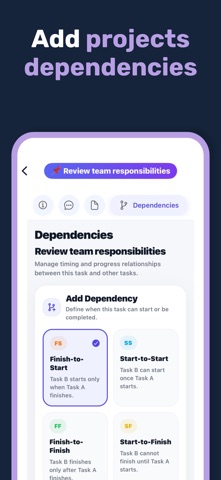
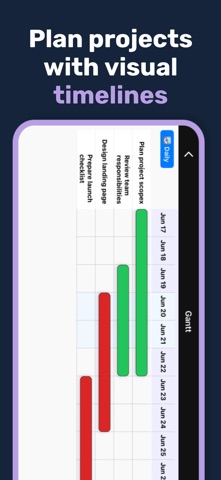
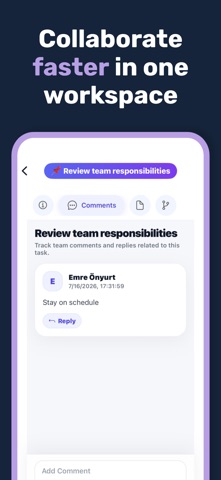
And because projects don’t only happen at your desk, GanttMaster keeps your tasks, timelines, team, reminders, risks, and budgets with you wherever work happens. Project Management On the Go Manage projects from your phone or tablet wherever you are. Check today’s priorities, update tasks, review your Gantt timeline, collaborate with your team, and keep projects moving even when you’re away from your desk. Interactive Gantt Project Timeline Visualize your entire project with clear, dynamic Gantt charts. Track: • Tasks and subtasks • Project schedules • Milestones • Start and due dates • Task dependencies • Project progress GanttMaster supports major dependency types including Finish-to-Start, Start-to-Start, and Finish-to-Finish. Task & Subtask Management Create tasks and subtasks, set priorities, assign responsibilities, and track progress in real time. Keep both simple projects and complex workflows organized in one place. Today View, Daily Tasks & Reminders Stay focused on what matters today. Create personal daily tasks, review project tasks due today, and set reminders so important work doesn’t get forgotten. Team Collaboration Bring your team into one centralized workspace. • Assign tasks • Add comments • Share file links • Track updates • Organize teams and responsibilities Collaborate without adding extra cost for every project seat. Project Risk Management Identify and track project risks before they become bigger problems. Add risk categories, likelihood, impact, mitigation plans, owners, and due dates to keep your projects under control. Budget & Expense Tracking Keep project finances visible alongside your work. Set project budgets, record expenses, organize costs by category, and monitor remaining budget directly from your project. Real-Time Notifications Stay informed about important project activity including task updates, comments, assignments, deadlines, and reminders. Role-Based Access Organize project responsibilities with roles such as Project Manager, Team Manager, and User. Control how different team members participate in your projects. Project Templates Start new projects faster by reusing existing project structures. Templates can include tasks, subtasks, schedules, and project workflows, helping you reduce repetitive setup work and maintain consistency. Why Choose GanttMaster? GanttMaster combines the essential tools you need to plan and manage projects without unnecessary complexity. • No extra cost per project seat • Project management on the go • Interactive Gantt charts • Task and subtask management • Daily planning and reminders • Team collaboration • Risk management • Budget and expense tracking • Project templates • Real-time notifications Whether you’re managing a startup, a client project, a remote team, or your own business, GanttMaster helps you keep everyone aligned and every project moving forward. Your projects. Your whole team. Wherever work happens. Start managing projects smarter with GanttMaster. Terms of Use: https://www.apple.com/legal/internet-services/itunes/dev/stdeula/ Privacy Policy: https://ganttmaster.com/privacy.html
- Developer
- Meva Aise Onyurt
- Category
- Productivity
- Age rating
- 4+
- Available on
- iPhone
What to post
Post ideas, not real affiliate posts
- Post idea
Mobile Gantt chart workflow demo
Record your screen adjusting a project timeline on your phone. Show how shifting one task dependency automatically updates the entire project schedule and milestones on the interactive Gantt chart.
- Post idea
Morning project planning routine on phone
Film your morning coffee routine while checking the Today View in the app. Show how you review tasks due today, set reminders, and check assigned team updates before starting work.
- Post idea
Managing team projects without per seat fees
Screen record adding team members to a project without paying extra per-seat fees. Then tap into the budget tracker to log project expenses alongside assigned tasks in real time.
How it works
- 1
Share your link or code
Put it in your bio, videos or stories.
- 2
Earn on each sale
Get commission when someone you referred subscribes or buys.
- 3
Get paid
Track every referral in your dashboard and get paid out.
Questions
- How much can I earn promoting GanttMaster?
- You earn 23% of every payment from people you refer, for as long as they stay subscribed. With 100 subscribers on the current plan mix that is about $100 a month.
- When do I get paid?
- The company pays you directly. Paid at least every 4 months once you pass the minimum.
- How are my referrals tracked?
- You get your own link and short code. Anyone who taps your link or enters your code before their first purchase is linked to you, and their renewals keep counting.
- Does it cost anything to join?
- No. Joining is free for affiliates.
Earnings example
EstimateEstimated from this app's App Store prices and the industry average split between plans (RevenueCat State of Subscription Apps 2026). Not this app's own sales. An example, not a promise.
How you get paid
- The company pays you directly
- Paid at least every 4 months once you pass the minimum
What you share
Your own link and a short code. Followers tap the link, or enter the code in the app before they buy.
More Productivity programs


I want to help you setup your iOS or android affiliate scheme
Book a call with me and we can run through your ideas, get help with setup, or speak to me about your current affiliate situation
“I couldn't use affiliate marketing in my subscription app, so I built insert affiliate to solve this issue”- Michael Butler, CEO